The Definitive Guide to eSIM Compatible Devices in 2025
Tired of fumbling with physical SIM cards when switching carriers or traveling abroad? An eSIM compatible device eliminates this hassle by embedding a programmable chip directly into your phone, tablet, or smartwatch. This built-in technology allows you to activate a cellular plan digitally, store multiple profiles simultaneously, and switch networks without touching a tiny piece of plastic. To use it, simply scan a QR code from your carrier or download an app to provision the eSIM instantly.
Understanding the Shift to Digital SIM Technology
Understanding the shift to digital SIM technology means grasping how your device’s hardware now stores your cellular profile, eliminating the need for a physical card. With an eSIM compatible device, activating a new plan often involves scanning a QR code or using an app, letting you switch carriers instantly without waiting for a plastic chip. A common question arises: “Does removing a physical SIM drain my battery?” No, the eSIM is embedded directly into the motherboard, often improving power efficiency compared to a traditional slot. This shift turns your phone into a more adaptable tool, perfect for juggling a work number and a local travel line simultaneously.
How Embedded SIMs Differ From Physical Cards
Unlike a physical SIM card you pop in and out, an embedded SIM (eSIM) is a tiny chip soldered directly onto your device’s motherboard. This means you cannot physically remove or swap it between phones. Instead, you activate a mobile plan digitally by downloading a profile, which makes switching carriers or adding a second number as simple as scanning a QR code or tapping a button in settings. With physical cards, you’d have to track down a tiny plastic piece, find a tool to open the tray, and handle the card carefully. The eSIM eliminates that entire process. To use an eSIM, the sequence is:
- Purchase a plan from a supported carrier.
- Receive a digital activation code or QR code.
- Scan or enter it in your device’s settings.
- Your profile activates instantly—no waiting for mail.
This embedded SIM vs physical card flexibility also lets you store multiple carrier profiles on one chip, though only one can be active at a time.
The Evolution of Mobile Connectivity Standards
The shift from physical SIM cards to digital eSIMs mirrors the core evolution of mobile connectivity standards themselves. Early standards like 2G and 3G relied on bulky, removable cards, but as networks advanced to 4G LTE and 5G, the hardware had to catch up. eSIM technology is a direct result of standards evolving to prioritize over-the-air provisioning, allowing you to switch carriers without swapping plastic. Embedded connectivity standards now let compatible devices choose the fastest available network seamlessly. This fundamentally changes how we think about “subscribing” to a mobile network.
Q: How have mobile standards changed the physical role of the SIM?
A: They shrank it from a full-sized card to a tiny, soldered chip, making it an invisible part of the device’s modem.
Apple’s Lineup With Built-In SIM Capabilities
Apple’s lineup with built-in SIM capabilities centers on devices that integrate an eSIM as the primary or sole cellular slot. Starting with the iPhone XS, XR, and later models, these esim compatible devices allow users to activate a mobile plan without a physical nano-SIM. The iPhone 14 series sold in the U.S. eliminates the physical SIM tray entirely, relying solely on dual eSIMs for connectivity. All iPad Pro, iPad Air, and iPad mini models with cellular support also include eSIM, though some older iPads retain a physical slot. For Apple Watch, the GPS + Cellular models use eSIM for tethering. An iPhone 13 or newer is the most practical entry point for a fully eSIM-only experience across carriers.
iPhone Models That Support Digital SIM Activation

For users seeking iPhone models that support digital SIM activation, Apple began integrating eSIM technology with the iPhone XR, XS, and XS Max. These models allow one active eSIM alongside a physical nano-SIM for dual service. The iPhone SE (2nd and 3rd gen) and all iPhone 11 through 14 series models continue this capability. With the iPhone 14 lineup sold in the United States, Apple removed the physical SIM tray entirely, making eSIM the sole activation method—users must scan a carrier QR code or use a carrier app to provision service. Those models include the iPhone 14, 14 Plus, 14 Pro, and 14 Pro Max, requiring digital SIM activation as the only option.
| iPhone Model | eSIM Activation Type | Physical SIM Tray? |
|---|---|---|
| iPhone XR, XS, XS Max | Digital SIM (dual SIM with physical nano-SIM) | Yes |
| iPhone SE (2nd & 3rd gen) | Digital SIM (dual SIM with physical nano-SIM) | Yes |
| iPhone 11 through 13 series | Digital SIM (dual SIM with physical nano-SIM) | Yes |
| iPhone 14 series (US models) | Digital SIM only (no physical SIM slot) | No |
iPad and Apple Watch Models With eSIM Integration
For users demanding cellular connectivity without physical SIM hassle, iPad and Apple Watch models with eSIM integration deliver unmatched convenience. Current iPad Pro, iPad Air, and iPad mini models support eSIM-only plans, allowing instant activation of data from a carrier like T-Mobile or Verizon without swapping cards. Apple Watch Series 6 and later, including the Ultra and SE, use an embedded eSIM to share your iPhone’s number, enabling calls and messages independent of the phone. The watch’s Family Setup feature even lets non-iPhone users activate a standalone eSIM line on the child’s watch. Both devices allow multiple eSIM profiles stored simultaneously, making regional travel or network switching seamless. No physical SIM tray removal or carrier store visit is required.
Samsung Galaxy Devices Ready for Virtual SIMs
Samsung Galaxy devices ready for virtual SIMs now span multiple flagship and mid-range series, including the Galaxy S, Note, Z Fold, and Z Flip lines from the S20 generation onward. On these eSIM compatible devices, you activate a virtual SIM directly within the Settings menu under Connections, either by scanning a carrier-provided QR code or manually entering activation details. This allows you to maintain two phone numbers simultaneously—one on the physical SIM and one on the eSIM—without swapping cards. For international travel, you can instantly download a local data plan from a supported carrier without visiting a store. Ensure your device runs One UI 4.0 or later for full eSIM profile management. Always check your specific model variant, as some regional versions may have eSIM functionality disabled.
Flagship Galaxy S Series With Dual SIM Options
The Flagship Galaxy S Series integrates eSIM technology with physical SIM slots to enable native dual SIM options without compromising premium design. Users can assign separate profiles for work and personal numbers, switching between them seamlessly via the phone’s settings menu. A physical nano-SIM occupies one slot, while the second line activates through the embedded eSIM, eliminating the need for a second physical card tray. This setup supports concurrent standby for both networks, allowing calls on one line while data remains active on the other. Q: Can both SIMs use 5G simultaneously? A: Yes, recent Galaxy S models support 5G on both the physical SIM and the eSIM, provided your carrier enables dual 5G standby.
Foldable Phones and Tablets That Accept Remote Profiles
Samsung’s foldable phones and tablets that accept remote profiles leverage eSIM technology to manage mobile connectivity without a physical card. Devices like the Galaxy Z Fold and Z Flip series allow users to download and switch between multiple carrier profiles, enabling dual-SIM functionality with one physical SIM and one eSIM. The Galaxy Tab S9 and newer tablets similarly support remote provisioning, letting travelers or business users activate a local data plan instantly. This setup is particularly useful for maintaining a separate work line on a foldable phone or tablet without juggling physical SIMs. Remote profiles are managed directly through the device’s settings, offering streamlined profile management for foldable devices devoid of carrier interruptions.
Google Pixel Phones Optimized for eSIM Usage
The Pixel 8 Pro sits on my desk, its screen dark, but the phone is already live. I’m not fumbling with a SIM tray; instead, I’ve loaded two separate eSIM profiles directly from the Google Pixel Phones Optimized for eSIM Usage settings menu. This device treats each digital profile as a native entity, letting me assign one for work calls and another for personal data without physical cards. On the Pixel 7a, I tested an international travel eSIM while keeping my home number active—a seamless split between two networks on one esim compatible devices ecosystem. The phone manages eSIM switching with a simple tap, showing signal bars for both simultaneously. There’s no lag, no rebooting; just instant connectivity tailored to my day, making the Pixel line feel designed for digital-first carriers.
Pixel 6 and Newer Generations With Extra SIM Slots
The Google Pixel 6 and newer generations, including the Pixel 7 and 8 series, offer a hybrid dual-SIM setup that pairs a physical nano-SIM slot with an embedded eSIM, enabling two active lines simultaneously. Users can store multiple eSIM profiles but activate only one at a time alongside the physical SIM. This configuration supports flexible dual-line management without requiring a second physical tray. However, the Pixel 6a and Pixel 7a, while eSIM-capable, lack the dual physical SIM slot found on some non-U.S. models. If the user needs two active physical SIMs, they must use a Pixel 7 Pro or Pixel 8 Pro, which include a second physical SIM slot in certain regions. Q: Can the Pixel 6 use two physical SIMs simultaneously? A: No, the Pixel 6 supports one physical SIM and one eSIM; only select Pixel 7 Pro and Pixel 8 Pro models offer a second physical SIM slot for dual physical SIM usage.

Nexus Legacy and Early Pixel Adopters
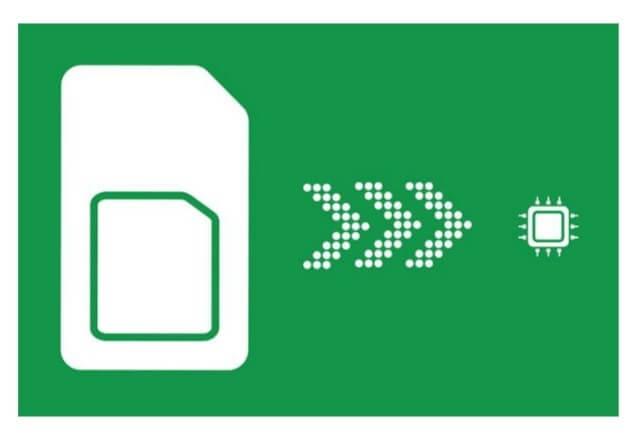
The Nexus Legacy, specifically the Nexus 6P and UK eSIM Nexus 5X, introduced early eSIM functionality, though it was limited to Google Fi activation and did not support multiple profiles. Early Pixel adopters, from the Pixel 2 onward, refined this with native eSIM support in Phone by Google, allowing direct profile downloads without carrier apps. The Pixel 2 and Pixel 3 series remain notable for enabling eSIM as a secondary line alongside a physical SIM, a practical dual-SIM setup not present in Nexus models. Nexus devices lacked eSIM for third-party carriers, while early Pixels offered broader compatibility through QR code scanning and manual activation codes.
| Aspect | Nexus Legacy (Nexus 6P/5X) | Early Pixel Adopters (Pixel 2/3) |
|---|---|---|
| eSIM use case | Google Fi only | Multiple carriers via QR code |
| SIM coexistence | No dual-SIM support | eSIM + physical SIM parallel |
| User configuration | Carrier-tethered setup | Manual profile import |
Other Major Android Manufacturers Embracing the Trend
Samsung, long an early adopter, now pairs its Galaxy S series with a second physical SIM slot, letting you run an eSIM for travel while keeping a local nano-SIM active. Google’s Pixel phones follow suit, pushing eSIM as the primary slot for quick carrier swaps without fumbling with a tray. OnePlus and Xiaomi have joined too, offering dual eSIM support in their flagship models—a boon for users juggling work and personal lines. This shift means Other Major Android Manufacturers Embracing the Trend aren’t just copying; they’re building esim compatible devices that make multi-network switching seamless. You no longer hunt for a paperclip at the airport—just scan a QR code from your carrier’s app and stay connected.
OnePlus, Oppo, and Xiaomi Models With eSIM Support
For users seeking OnePlus, Oppo, and Xiaomi models with eSIM support, each brand offers distinct options. OnePlus flagships like the OnePlus 12 and 12R include dual SIM capabilities, with one slot dedicated to eSIM. Oppo’s Find X7 Ultra and Reno11 Pro support eSIM alongside a physical nano-SIM. Xiaomi provides eSIM in its Xiaomi 14 and 14 Ultra, though availability varies by regional variant. Below is a comparison of these models:
| Brand | Model | eSIM + Physical SIM |
|---|---|---|
| OnePlus | 12, 12R | Yes (nano+eSIM) |
| Oppo | Find X7 Ultra, Reno11 Pro | Yes (nano+eSIM) |
| Xiaomi | 14, 14 Ultra | Yes (regional variation) |
Sony Xperia and Motorola Handsets With Digital Profiles
Sony Xperia and Motorola handsets integrate digital profiles to manage eSIM functionality with tangible user advantages. On Sony Xperia devices, the native settings menu allows seamless switching between a physical SIM and an eSIM profile for a second line, useful for travel or work separation without swapping cards. Motorola handsets, such as the Edge series, similarly support dual SIM via one physical slot and one eSIM digital profile, enabling simultaneous active connections. Both brands let users store multiple profiles, though only one eSIM can be active at a time. This facilitates quick carrier changes through a simple menu toggle, avoiding physical card handling. The focus remains on local profile management for direct user control over connectivity choices.
Global Handsets and Regional Availability
A global handset, like an Apple iPhone or Samsung Galaxy sold unlocked, usually supports eSIM but its regional availability varies by model. For example, a phone bought in the US might lack the specific eSIM firmware or bands needed for carriers in parts of Asia or Africa. Question: Can I use a European eSIM phone in Japan? Answer: Yes, if it’s a global variant with the correct LTE/5G bands for Japanese networks and supports the local eSIM QR profile. Always check the manufacturer’s regional SKU before traveling to avoid surprises.
Phones From Huawei, Honor, and ZTE That Include eSIM
Huawei, Honor, and ZTE each offer specific handsets with integrated eSIM, though availability varies sharply by region. Huawei’s P series, Mate series, and foldable Mate X models include eSIM, but newer devices like the P60 Pro rely on a custom eSIM implementation due to restrictions, often requiring local carrier apps for activation. Honor’s Magic series, such as the Magic5 Pro, include eSIM support, primarily in global versions outside China. ZTE’s Axon and Blade models, including the Axon 40 Ultra, feature eSIM, yet support is typically limited to select international markets. These Huawei Honor ZTE eSIM phones allow users to add a second line without a physical SIM, though buyers must verify regional compatibility with their carrier before purchase.
Carrier-Locked Models Versus Unlocked Devices
Carrier-locked eSIM devices restrict your digital profile to a single network’s infrastructure, often requiring specific carrier QR codes for activation. Unlocked eSIM devices grant immediate flexibility, allowing you to switch between global profiles without hardware changes or unlocking fees. This distinction directly impacts travel and multi-line use, as a locked phone may fail to recognize foreign eSIMs. For users prioritizing freedom, eSIM unlocking enables carrier independence without physical SIM trays. Does an unlocked device improve eSIM roaming? Yes, it permits instant local profile downloads upon arrival, avoiding carrier-specific roaming packs and their often higher costs, giving you full control over your connection.
Wearables and Smartwatches With Standalone Connectivity
A wearable with standalone connectivity, like an eSIM-compatible smartwatch, operates independently of your phone by using an embedded SIM to connect directly to a cellular network. This allows you to make calls, stream music, and receive notifications without carrying your smartphone. Q: Can I use any cellular plan for my eSIM smartwatch? A: No, your watch requires a compatible standalone plan or a shared plan from your carrier that provisions a separate number or clones your phone’s line to the eSIM. This setup frees you from tethering, making the device fully functional during runs or errands.
Apple Watch Series and SE Models Using Cellular Plans
For the Apple Watch Series and SE models, a cellular plan leverages an embedded eSIM to enable standalone connectivity away from your iPhone. Activation involves a simple sequence through your carrier’s Apple Watch app. The process is straightforward:
- Open the Apple Watch app on your paired iPhone.
- Select “Cellular” and tap “Set Up Cellular.”
- Choose an existing plan or add a new line, then follow carrier prompts for eSIM activation.
Once active, you can make calls, stream music, and use Maps without carrying your phone—your watch becomes a fully independent device. The cellular feature also provides automatic fallback, ensuring connectivity via your iPhone when it is in range, preserving battery life and data efficiency.
Samsung Galaxy Watch and Google Pixel Watch Compatibility
For standalone eSIM connectivity, the Samsung Galaxy Watch and Google Pixel Watch offer distinct compatibility paths. The Galaxy Watch series (starting from the Galaxy Watch 4) works seamlessly with Samsung phones and most Android devices, requiring a carrier-specific eSIM plan. In contrast, the Google Pixel Watch is optimized for Pixel phones but supports other Android devices, yet its eSIM setup is exclusively through Google Fi or select carriers. Cross-brand eSIM pairing remains limited, as neither device supports iPhones for standalone activation. While both watches share Wear OS, their eSIM provisioning tools are not interchangeable, demanding users stick to their intended phone ecosystem.
| Compatibility Aspect | Samsung Galaxy Watch | Google Pixel Watch |
|---|---|---|
| Phone Requirement | Samsung or Android (Android 8+) | Pixel or Android (Android 8+) |
| eSIM Carrier Lock | Carrier-specific plans | Google Fi + select carriers |
| iPhone Support | No | No |
| Standalone eSIM Setup | Via Samsung Wearable app | Via Pixel Watch app & Google Fi |
Laptops, Tablets, and Laptops With Built-In SIM Chips
Laptops, Tablets, and Laptops With Built-In SIM Chips are the core hardware for leveraging eSIM compatible devices beyond smartphones. These devices eliminate the need for physical plastic SIM cards, letting you activate a cellular data plan instantly from the device’s settings. A laptop or tablet with a built-in eSIM chip allows you to maintain always-on connectivity, crucial for remote work or travel, without hunting for Wi-Fi. The key advantage is that you can store multiple carrier profiles on one eSIM and switch between them in seconds, unlike a physical SIM that requires a tool and a card swap. This makes managing global data plans or temporary hotspot connectivity seamless on your eSIM compatible devices.
Microsoft Surface Pro and Lenovo ThinkPad Lineups
The Microsoft Surface Pro and Lenovo ThinkPad lineups integrate eSIM technology for direct cellular connectivity, eliminating the need for physical SIM cards. In the Surface Pro 9 and newer models, eSIM enables seamless switching between carriers via Windows settings. Lenovo integrates eSIM into ThinkPad X1 Carbon and X1 Yoga series, supporting dual LTE or 5G connections. To activate eSIM:

- Navigate to the device’s mobile broadband settings
- Scan a carrier’s QR code or download the eSIM profile
- Confirm activation; the eSIM becomes the primary mobile data source
Both lineups allow concurrent use of physical SIM and eSIM for failover or roaming flexibility, with ThinkPads offering hardware-managed eSIM via Lenovo’s LTE manager.
iPad Pro and Cellular-Connected Chromebooks
The iPad Pro and Cellular-Connected Chromebooks let you bypass Wi-Fi dependency by embedding an eSIM directly into the tablet or laptop hardware. On the iPad Pro, you activate mobile data through the Settings app, choosing a plan from supported carriers without needing a physical SIM. Cellular Chromebooks, such as the Lenovo Duet 5 or Acer Spin 513, integrate the eSIM into the motherboard, enabling instant connectivity for cloud-based workflows like Google Docs or Drive access. eSIM profiles can be switched on-the-fly between business and personal lines. Can I use my iPad Pro and Cellular Chromebook simultaneously on the same eSIM plan? Typically no—each device requires its own separate eSIM profile and data plan.
Checking a Device’s Compatibility Before Buying
Before purchasing a device, checking eSIM compatibility is essential to avoid connectivity issues. First, confirm the device’s specifications list an eSIM slot, as not all models support it. Then, verify that the carrier network you plan to use is compatible with that specific eSIM, as some providers lock the feature. Additionally, ensure the device is carrier-unlocked if you intend to switch networks. Always check regional firmware variants, as a phone sold in one country may lack eSIM support in another. Finally, consult the manufacturer’s official list of compatible eSIM profiles to guarantee seamless activation.
How to Find IMEI or eSIM QR Codes in Settings
To verify compatibility, first locate the device’s IMEI or eSIM activation QR code within the Settings menu. On an iPhone, navigate to **Settings > General > About**, where the IMEI is listed; for eSIM setup, go to **Settings > Cellular > Add Cellular Plan** to scan a carrier-provided QR code. On Android, open **Settings > About Phone > Status** to view the IMEI, or access eSIM details via **Settings > Connections > SIM Card Manager**. For eSIM transfer, follow this sequence:
- Open **Settings > Network & Internet > Mobile Network**.
- Select **Download a SIM instead** or **Add eSIM**.
- Scan the QR code delivered by your carrier.
Verifying Through Carrier Lists and Manufacturer Specs
To confirm eSIM support, consult the carrier list and manufacturer specifications for your exact device model. First, check the manufacturer’s official website for the product’s technical specs, which explicitly state eSIM functionality. Second, verify your carrier’s eSIM compatibility database by entering your device’s IMEI number. This two-step process eliminates ambiguity, as some models support eSIM only in specific regions or after a firmware update.
- Locate the device model number and firmware version in system settings.
- Cross-reference with the manufacturer’s published spec sheet for eSIM hardware inclusion.
- Use the carrier’s online IMEI checker to confirm network-side provisioning.
Common Implementation Challenges Across Platforms
When switching your esim compatible devices between an Android phone and an iPhone, you often hit walled-garden transfer limits. A carrier might require scanning a new QR code for Android, yet the same profile seamlessly transfers via cloud sync on iOS. On Windows laptops with integrated eSIM, I’ve seen complete profile loss after a firmware update, forcing a re-download from the carrier portal. Cross-platform esim implementation challenges also appear with dual-SIM management: iOS hides secondary profile details behind restrictive API calls, while Samsung’s One UI lets you rename and reorder them freely. Even resetting network settings on one OS can silently deactivate an eSIM that works perfectly on another, leaving you hunting for a Wi-Fi hotspot just to re-download the profile.
Regional Restrictions and Single-User Limitations
Regional restrictions on eSIM-compatible devices often lock a device’s eSIM profile to a specific geographic area, preventing activation or roaming on networks outside that region. This can render a device unusable for international travel unless a local eSIM is re-provisioned. Single-user limitations further constrain utility by binding the eSIM to the original purchaser’s account or IMEI, blocking profile transfers or secondary user activation. Geofencing of eSIM profiles thus creates a practical barrier where a device cannot function as a globally shared resource, forcing users to manage separate profiles for each region or user.
| Constraint | User Impact on eSIM Device |
|---|---|
| Regional Restrictions | eSIM fails to activate outside a country; requires new local profile. |
| Single-User Limitations | eSIM cannot be transferred or shared; each device is locked to one account. |
Data Roaming and Profile Switching Hurdles
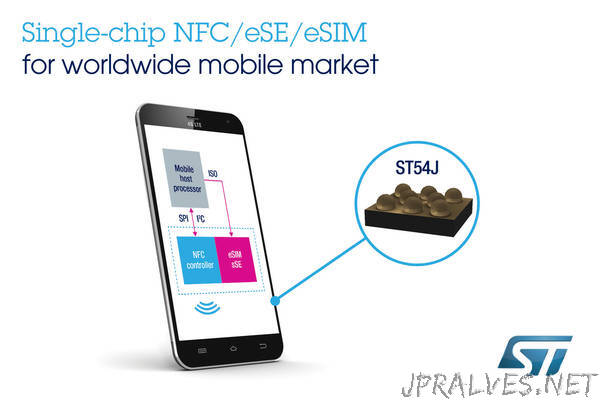
Data roaming with eSIM often bumps into unexpected hurdles. When you cross a border, your phone might not automatically latch onto the best local network, forcing you into manual profile switching toggles just to get a signal. Worse, some devices make you juggle between an active eSIM and a physical SIM, risking accidental data charges if the wrong profile is left live. It is a clunky dance of digging into settings every time you land.
Why does my eSIM not auto-switch to a local network when I land in a new country? Most eSIMs lack automated profile activation; you must manually download and enable a new data plan from your provider, as devices rarely handle multi-profile roaming seamlessly on their own.
Future Trends in Embedded Connectivity
Future trends in embedded connectivity will push eSIM-compatible devices beyond simple mobile plans. You’ll see gadgets that automatically switch to satellite networks when out of cell range, keeping your smartwatch or laptop online anywhere. Devices will also tap into local IoT meshes, using the eSIM to join temporary, hyper-local networks for traffic or weather data without draining your data cap. The eSIM itself will become smarter, pre-loading connectivity profiles for entire regions, so a new drone or tracker works the moment you power it on. This evolution means your gear will handle seamless network switching and direct access to embedded IoT meshes, making connectivity feel as automatic as turning on the screen.
Rise of Multi-Profile Management Tools
The rise of multi-profile management tools for eSIM compatible devices centers on software that lets users switch between carrier profiles without physical swaps. These tools enable a single smartphone to host separate plans for work, travel, and personal use, with seamless profile switching controlled through a unified interface. Users can pre-load several eSIM profiles, then activate or deactivate them on demand, often via a simple toggle. This eliminates carrying multiple physical SIMs while maintaining instant access to different networks. Practical benefits include selecting a local data profile when arriving in a new country, or isolating a work number during off-hours, all managed directly from the device’s settings menu.
Integration With 5G and IoT Ecosystems
In future embedded connectivity, seamless 5G and IoT ecosystem integration transforms eSIM-compatible devices into autonomous nodes capable of dynamic network selection. These devices automatically switch between 5G standalone and non-standalone architectures to optimize low-latency industrial sensor streams or high-bandwidth video analytics. The eSIM’s programmable identity allows a single device to negotiate network slices for diverse IoT protocols—such as NB-IoT for metering and URLLC for autonomous machinery—without hardware swaps. This enables real-time reconfiguration across smart city, agricultural, or logistics grids, where devices adapt connectivity profiles based on geofencing or power budgets. Practical implementations include fleet telematics units automatically shifting from satellite to 5G coverage zones, and medical wearables maintaining constant cloud synchronization across carrier boundaries.